

In Part 1, I traced how HTTPS works from the ground up. Asymmetric cryptography, certificate chains, the TLS handshake. By the end, a browser and a server could talk securely over an untrusted network.
But that only solves one part of the problem.
TLS answers: “Can I trust this server?” AWS IAM answers: “Can I trust this caller, and what are they allowed to do?”
These are different questions. And inside AWS, the second one comes up constantly — every time a Lambda reads from S3, every time a service talks to another service, every time a developer runs a CLI command.
This article is about that second question. Not the theory. The actual mechanics.
(JWT and OAuth are coming in a separate part. This article focuses on how AWS itself solves auth at the infrastructure level.)
1. The Problem AWS IAM Solves
When I first started building on AWS, the instinct was to use access keys. Generate a key, drop it into an environment variable, done. Lambda reads from S3. EC2 writes to DynamoDB. Glue pulls from RDS. Each service authenticates with a static credential.
That falls apart quickly.
Keys leak through logs, environment dumps, or accident
Rotating them across dozens of services is painful
There’s no natural expiry
A leaked key stays valid until someone manually revokes it
AWS IAM solves this with a different model entirely.
No passwords. No static keys in services. Every identity is temporary, scoped, and auto-rotating.
The mechanism that makes this possible is STS — the Security Token Service.
2. Who Are You in AWS?
Before getting into STS, there’s a foundational concept worth getting right.
In AWS, every entity that makes a request is called a Principal — the thing that is authenticated and making the request.
Principal Type      Example
---------------------------------------------------------------------------
IAM User            arn:aws:iam::123456789:user/vishal
IAM Role            arn:aws:iam::123456789:role/my-lambda-role
AWS Service         lambda.amazonaws.com
AWS Account         arn:aws:iam::123456789:root
Federated identity  via SAML / OIDC / Cognito
Everyone            *
I used to think of IAM Users as the primary identity in AWS. In practice, IAM Roles are the more important primitive. Roles aren’t tied to a person. They’re tied to a purpose. Any entity that AWS trusts can assume a role and act with its permissions.
That word — assume — is load-bearing. Everything else flows from it.
3. The Two Policies Every Role Has
An IAM Role is defined by two policies. Both matter.
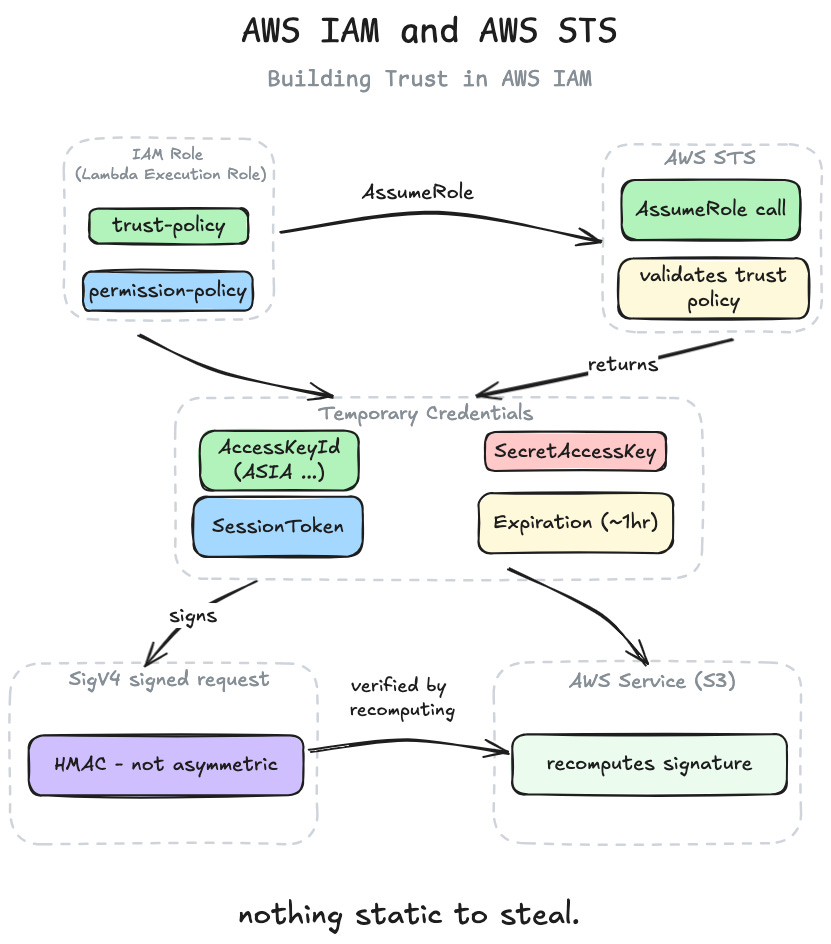
Trust Policy — who is allowed to assume this role:
{
  "Version": "2012-10-17",
  "Statement": [
    {
      "Effect": "Allow",
      "Principal": {
        "Service": "lambda.amazonaws.com"
      },
      "Action": "sts:AssumeRole"
    }
  ]
}
This says: only the Lambda service is allowed to assume this role.
Permission Policy — what this role is allowed to do:
{
  "Version": "2012-10-17",
  "Statement": [
    {
      "Effect": "Allow",
      "Action": ["s3:GetObject", "s3:PutObject"],
      "Resource": "arn:aws:s3:::my-bucket/*"
    }
  ]
}
This says: whoever assumes this role can read and write objects in my-bucket.
Two separate concerns. Who can become this identity. What this identity can do.
Trust policy = the door. Permission policy = what’s behind it.
4. How a Request Actually Gets to AWS
Before following a request end-to-end, there’s one more piece to understand: how do humans and applications even reach AWS?
AWS Console — password + MFA. Log in, get a session.
AWS CLI — access key + secret, configured once. The CLI signs every request on behalf of the caller.
AWS SDK — same access key + secret, OR an IAM Role if running on AWS compute. The SDK resolves credentials automatically via a credential provider chain — it checks env vars, then credentials file, then the instance metadata service, and so on. The same code works locally and on EC2 without modification.
Direct API — everything above is ultimately a wrapper. Under the hood, every AWS API call is an HTTPS request signed with Signature Version 4 (SigV4).
SigV4 is the equivalent of TLS’s handshake signature — it proves the caller holds a specific key, and it binds the request to a specific time, region, and service so it can’t be replayed or redirected.
I’ll show exactly what SigV4 looks like later in this article.
5. Following a Request End-to-End
The clearest way to understand this is to follow one request through the entire system. A Lambda function reading a file from S3.
Step 1: A role is attached to the Lambda
The Lambda is created with an IAM Role attached to it. The trust policy on that role says lambda.amazonaws.com is allowed to assume it. The permission policy says the role can call s3:GetObject on my-bucket.
aws lambda create-function \
  --function-name my-function \
  --role arn:aws:iam::123456789012:role/my-lambda-role \
  ...
Nothing has happened yet. The role is just a definition.
Step 2: Lambda is invoked, AWS runtime calls STS
The function is invoked. Before the handler code even starts, the AWS Lambda runtime calls STS automatically:
POST https://sts.amazonaws.com/

Action=AssumeRole
&RoleArn=arn:aws:iam::123456789012:role/my-lambda-role
&RoleSessionName=my-function-execution-abc123
&DurationSeconds=3600
This happens invisibly. No code written, no configuration needed. The platform handles it before handing control to the handler.
Step 3: STS returns temporary credentials
STS checks the trust policy — does it allow lambda.amazonaws.com to assume this role? Yes. It returns:
{
  "Credentials": {
    "AccessKeyId":     "ASIAXXXXXXXXXXX12345",
    "SecretAccessKey": "wJalrXUtnFEMI/K7MDENG/bPxRfiCYEXAMPLEKEY",
    "SessionToken":    "FwoGZXIvYXdzEJr...long-token...Tuw==",
    "Expiration":      "2026-04-08T11:00:00Z"
  }
}
The AccessKeyId starts with ASIA. That prefix always means temporary STS credentials. Permanent IAM user keys start with AKIA. One letter carries the whole story.
These credentials are injected into the Lambda execution environment before the handler starts.
Step 4: SDK picks up credentials — without any explicit configuration
The handler code is simply:
cfg, err := config.LoadDefaultConfig(context.TODO())
s3Client := s3.NewFromConfig(cfg)
No credentials passed explicitly. The SDK walks the credential provider chain:
1. Hard-coded in code?               → no
2. AWS_ACCESS_KEY_ID env var?        → no
3. ~/.aws/credentials file?          → no
4. ECS container endpoint?           → no
5. Lambda runtime env vars?          → YES ✓
   AWS_ACCESS_KEY_ID     = ASIAXXXXXXXXXXX12345
   AWS_SECRET_ACCESS_KEY = wJalrXUtnFEMI/...
   AWS_SESSION_TOKEN     = FwoGZXIvYXdzEJr...
The STS call already happened before your code started. The SDK’s job here is purely credential discovery, not credential generation. It finds the credentials sitting in env vars and picks them up.
This is why the same code works locally — locally it picks up from ~/.aws/credentials. On Lambda it picks up from env vars. Not a single line of code changes.
Step 5: SDK builds the canonical request
Your code calls s3Client.GetObject(...). The SDK translates this into an HTTP request, but before sending it, it has to sign it. To sign it, it first needs to normalize it.
The request could be expressed in many equivalent ways — different header casing, different query string order, trailing slashes. HMAC-SHA256 is sensitive to every character. If the signer and verifier normalize differently, the signatures won’t match.
The solution is a canonical request — one strict, agreed-upon representation of the request:
GET
/my-file.txt

host:my-bucket.s3.amazonaws.com
x-amz-content-sha256:e3b0c44298fc1c149afb...
x-amz-date:20260408T100000Z
x-amz-security-token:FwoGZXIvYXdzEJr...

host;x-amz-content-sha256;x-amz-date;x-amz-security-token

e3b0c44298fc1c149afb...
The word canonical means exactly that — one authoritative form. Both the SDK (signing) and AWS (verifying) apply the same normalization rules and arrive at the identical string. Then they both sign it. The signatures match, or the request is rejected.
Normalization rules:
HTTP method → always uppercase
URI path → always normalized
Query string → sorted alphabetically
Header names → always lowercase, sorted alphabetically
Header values → whitespace trimmed
Body → always SHA256 hashed, never included raw
Step 6: SigV4 signing
# Hash the canonical request
SHA256(canonical_request) = "3b4c5d6e..."

# Build string to sign
AWS4-HMAC-SHA256
20260408T100000Z
20260408/us-east-1/s3/aws4_request
3b4c5d6e...

# Derive signing key — scoped per date, region, service
kDate    = HMAC-SHA256("AWS4" + SecretAccessKey, "20260408")
kRegion  = HMAC-SHA256(kDate,    "us-east-1")
kService = HMAC-SHA256(kRegion,  "s3")
kSigning = HMAC-SHA256(kService, "aws4_request")

# Final signature
Signature = HMAC-SHA256(kSigning, string_to_sign)
The signing key is derived fresh for every date, region, and service combination. A key valid for S3 today cannot sign a DynamoDB request. A key for us-east-1 cannot be used in eu-west-1. The scope is baked into the key itself.
The signature goes into the Authorization header:
Authorization: AWS4-HMAC-SHA256
  Credential=ASIAXXXXXXXXXXX12345/20260408/us-east-1/s3/aws4_request,
  SignedHeaders=host;x-amz-content-sha256;x-amz-date;x-amz-security-token,
  Signature=fe5f80f77d5fa3beca...
Wait — where are the private and public keys?
Coming from TLS, this was the question I had too. SigV4 doesn’t use asymmetric cryptography at all. There are no private or public keys here.
TLS uses asymmetric signing because the verifier (the browser) doesn’t know the signer (the server) in advance. The public key travels via a certificate, and anyone with the public key can verify the signature without knowing the private key.
SigV4 uses HMAC — a symmetric scheme. Both sides use the same secret:
TLS   → Sign(private_key, data)   | Verify(public_key, signature, data)
SigV4 → HMAC(secret_key, data)    | HMAC(secret_key, data) → compare
The shared secret is the SecretAccessKey from the STS credentials. The SDK has it because STS returned it. AWS has it because STS generated it in the first place. When S3 receives the request, it asks STS for the SecretAccessKey associated with this AccessKeyId and SessionToken, then recomputes the signature independently.
HMAC works here because the trust model is different — AWS issued the secret itself, so both sides already share it. No certificate infrastructure needed. And since the secret is short-lived (expires in an hour), the risk profile is much lower than a long-lived private key.
Step 7: S3 validates everything
S3 receives the request and runs through a checklist:
Extracts
AccessKeyIdfrom theAuthorizationheader.ASIAprefix means it also expects aSessionToken.Calls STS internally to validate the
SessionToken— is it valid, non-expired, which role does it belong to?Independently recomputes the canonical request and signature using the same rules. Compares with what arrived in the header.
Checks IAM — does
my-lambda-rolehaves3:GetObjecton this specific bucket and key?Any explicit Deny anywhere? Any bucket policy that blocks this?
All checks pass. Response returned.
The request signature is verified by recomputing it independently. AWS never trusts the signature — it re-derives it. This is the same principle as TLS certificate verification — trust is established by recomputing, not by accepting.
Step 8: Credentials expire, cycle repeats
At Expiration, the credentials become useless — even if an attacker intercepted them. The Lambda runtime calls STS again automatically before expiry. Fresh credentials are injected. The handler code sees none of this cycle.
6. Who Makes the STS Call?
The Lambda example showed the platform calling STS before your code runs. But that’s not universal.
Service                              Who calls STS
------------------------------------------------------------------------------
Lambda, ECS, Fargate, App Runner     AWS platform, before code starts.
                                     Credentials pre-injected into env vars
                                     or container credentials endpoint.

EC2                                  IMDS at 169.254.169.254 calls STS and
                                     caches the result. The SDK calls IMDS,
                                     never STS directly.

EKS (via IRSA)                       A different mechanism — worth its own
                                     article.

Cross-account, Federation, CLI       Explicit AssumeRole call in application
                                     code.
The mechanism is always the same. STS, temporary credentials, signed requests. What changes is who initiates the STS call.
EC2 and IMDS — a closer look
Lambda is short-lived, so pre-injecting credentials before the handler starts works fine. EC2 is different — an instance can run for months. Pre-injected credentials would expire with no runtime to refresh them.
AWS solves this with the Instance Metadata Service (IMDS) — a special HTTP server running on every EC2 instance at a fixed link-local IP:
http://169.254.169.254This IP is not routable. Nothing outside the instance can reach it. Only processes running on that specific EC2 instance can hit it.
IMDS exposes the instance’s IAM credentials at a well-known path:
curl http://169.254.169.254/latest/meta-data/iam/security-credentials/my-ec2-role
{
  "AccessKeyId":     "ASIAXXXXXXXXXXX12345",
  "SecretAccessKey": "wJalrXUtnFEMI/...",
  "Token":           "FwoGZXIvYXdzEJr...",
  "Expiration":      "2026-04-08T12:00:00Z"
}
IMDS called STS internally when the role was attached, cached the result, and serves it via this endpoint. It also handles rotation — before Expiration, it calls STS again and updates the cache. The SDK just reads from IMDS. It never touches STS directly.
SDK credential provider chain
        ↓
GET http://169.254.169.254/latest/meta-data/iam/security-credentials/<role>
        ↓
IMDS returns (AccessKeyId, SecretAccessKey, Token)
        ↓
SDK uses these to sign the request
IMDSv2 — closing an SSRF gap
SSRF (Server-Side Request Forgery) is an attack where the attacker tricks the server itself into making a request to an internal resource the attacker can’t reach directly. A classic example — a web app has a “fetch this URL for me” feature. Intended for external URLs. But if an attacker passes http://169.254.169.254/latest/meta-data/iam/security-credentials/my-ec2-role, the server dutifully fetches it and hands back valid AWS credentials. The attacker never touched IMDS directly — they couldn’t, it’s only reachable from inside the instance. But the server could, and the server was fooled into doing it.
The original IMDS had exactly this problem. Any code running on the instance — including code exploiting an SSRF vulnerability in the application — could hit 169.254.169.254 and walk away with valid credentials.
IMDSv2 added a session-token requirement. Before fetching credentials, the caller must first do a PUT request to get a short-lived session token, then use that token in the GET:
# Step 1: get a session token
TOKEN=$(curl -X PUT \
  -H "X-aws-ec2-metadata-token-ttl-seconds: 21600" \
  http://169.254.169.254/latest/api/token)

# Step 2: use the token to fetch credentials
curl -H "X-aws-ec2-metadata-token: $TOKEN" \
  http://169.254.169.254/latest/meta-data/iam/security-credentials/my-ec2-role
SSRF exploits typically follow HTTP redirects but can’t make a PUT with a custom header. That one constraint closes the attack vector. AWS SDKs handle IMDSv2 automatically — this is just what’s happening underneath.
This connects back to the same thesis from section 8 — the architecture is designed so there’s nothing static to steal. Even the path to credentials has a time-limited gate in front of it.
7. Cross-Account Access — The Same Story, One Level Up
At work, I ran into this exact situation. A Step Function in one AWS account needed to trigger a Lambda in a completely different account. At first it felt like a special case — some obscure AWS feature I hadn’t seen before. Turns out it’s the same STS story, just applied across account boundaries.
Everything so far has been single-account. But real systems span multiple accounts. Production in one account, data in another, logging in a third.
By default, AWS accounts are completely isolated. A Lambda in Account A has zero access to anything in Account B.
The solution is the same STS story — just applied across account boundaries.
Account A (123456789012) — Lambda lives here
Account B (999988887777) — S3 bucket lives here
Setup: Two sides must agree
In Account B, a role is created with a trust policy explicitly allowing Account A’s Lambda role to assume it:
{
  "Principal": {
    "AWS": "arn:aws:iam::123456789012:role/my-lambda-role"
  },
  "Action": "sts:AssumeRole",
  "Condition": {
    "StringEquals": {
      "sts:ExternalId": "shared-secret-xyz"
    }
  }
}
In Account A, my-lambda-role is given permission to call AssumeRole on Account B’s role:
{
  "Action": "sts:AssumeRole",
  "Resource": "arn:aws:iam::999988887777:role/cross-account-role"
}
Both sides must agree. Account B’s role trusts Account A. Account A’s role is allowed to call AssumeRole on Account B’s role. Missing either side means access denied.
The flow
The Lambda code explicitly calls STS:
result, err := stsClient.AssumeRole(context.TODO(), &sts.AssumeRoleInput{
    RoleArn:         aws.String("arn:aws:iam::999988887777:role/cross-account-role"),
    RoleSessionName: aws.String("lambda-cross-account-session"),
    ExternalId:      aws.String("shared-secret-xyz"),
})
STS checks both sides, and if both agree, returns a second set of temporary credentials — scoped entirely to Account B.
The Lambda ends up holding two layers of credentials simultaneously:
Layer 1 — Account A credentials (from runtime, automatic)
  → used for anything in Account A
  → used to call STS AssumeRole for Account B

Layer 2 — Account B credentials (from explicit AssumeRole call)
  → used only for resources in Account B
  → separate session, separate expiry, separate rotation
The mechanism is identical. The STS story just runs twice.
Why ExternalId matters even more here
In single-account, a compromised role damages only that account. In cross-account, if a third-party vendor’s AWS account is compromised, an attacker could try to assume the role from their account.
ExternalId is the defence. Even with full access to the vendor’s account, an attacker doesn’t know the ExternalId. The AssumeRole call fails. This is the confused deputy problem — a service being tricked into acting on behalf of someone it shouldn’t trust.
8. The Thesis: No Passwords Anywhere
Step back and look at the pattern.
A Lambda reads from S3. No password was configured. No key was hardcoded. No secret was shared between the two services. Yet the request was authenticated, authorized, and completed.
How?
A role defined who can act and what they can do
STS issued short-lived credentials when needed
The credentials signed every request cryptographically
The signature was verified by recomputing it independently
When credentials expired, STS issued fresh ones automatically
This is the same insight as TLS — except TLS applied it to network connections, and AWS IAM applies it to service-to-service calls inside a cloud platform.
In TLS: asymmetric cryptography establishes trust, then symmetric keys handle communication. Neither side stores a shared password.
In AWS IAM: roles define trust, STS issues tokens, SigV4 signs every request. No service stores another service’s password.
The architecture is designed so that there is nothing static to steal.
Leaked credentials expire. Intercepted requests can’t be replayed — the timestamp and scope are signed. A key valid for one service can’t be used against another.
The security property isn’t that secrets are well-hidden. It’s that secrets are designed to be short-lived and narrowly scoped from the start.
9. What’s Still Open
This article followed a single request through IAM and STS. But there’s more to the full picture.
Policy evaluation logic — when a request arrives at AWS, how exactly is the allow/deny decision made? Identity-based policies, resource-based policies, and Service Control Policies all interact. The logic is non-trivial and worth its own article. The mental model is similar to what OPA/Rego does — a policy engine evaluating structured rules against a request context — but AWS’s version is closed and AWS-specific.
Federation — real humans in large orgs don’t get IAM users. They authenticate via SAML or OIDC against a corporate identity provider, and AWS maps that identity to a role via AssumeRoleWithSAML or AssumeRoleWithWebIdentity. The STS story is the same, the entry point is different.
JWT and OAuth — how applications represent and delegate identity outside of AWS. Coming in the next part.
The chain of trust keeps extending. TLS secured the channel. IAM secured the caller. What comes next is how identity is represented and carried across the boundaries of individual systems.
If something landed differently than expected, or if there’s a gap I didn’t cover, I’m curious to hear it.