

I built a file upload service to understand where data lives during an 8GB upload. Not “in memory” as a vague concept. Where in RAM? How much? For how long?
The upload finished too fast to observe. An 838-byte test file completed in under a millisecond. To actually see progress events stream back to the client, I needed to slow it down.
That led to building a token bucket rate limiter from scratch. Not because the service needed throttling, but because understanding how to control data flow at the io.Reader layer turned out to be the clearest way to understand streaming itself.
This is Part 1 of HTTP Protocol Deep Dives. Each article covers one prototype built from scratch to understand a specific HTTP concept at the wire level.
What Gets Built
Three endpoints:
POST /upload/initiate         # → registers upload, returns {upload_id, upload_url}
PUT  /upload/{uploadid}       # → receives file, streams to disk
GET  /upload/progress/{uploadid}  # → SSE stream of upload progress
No S3 pre-signed URLs. No message queues. The goal is to understand the HTTP machinery directly, not abstract it away.
The upload endpoint accepts multipart/form-data and streams the file to disk using io.Copy. The progress endpoint opens a Server-Sent Events stream and polls upload state every 200ms. Two separate HTTP connections for one upload.
Where Data Lives
Before walking through the implementation, here’s where the data actually sits at each stage.
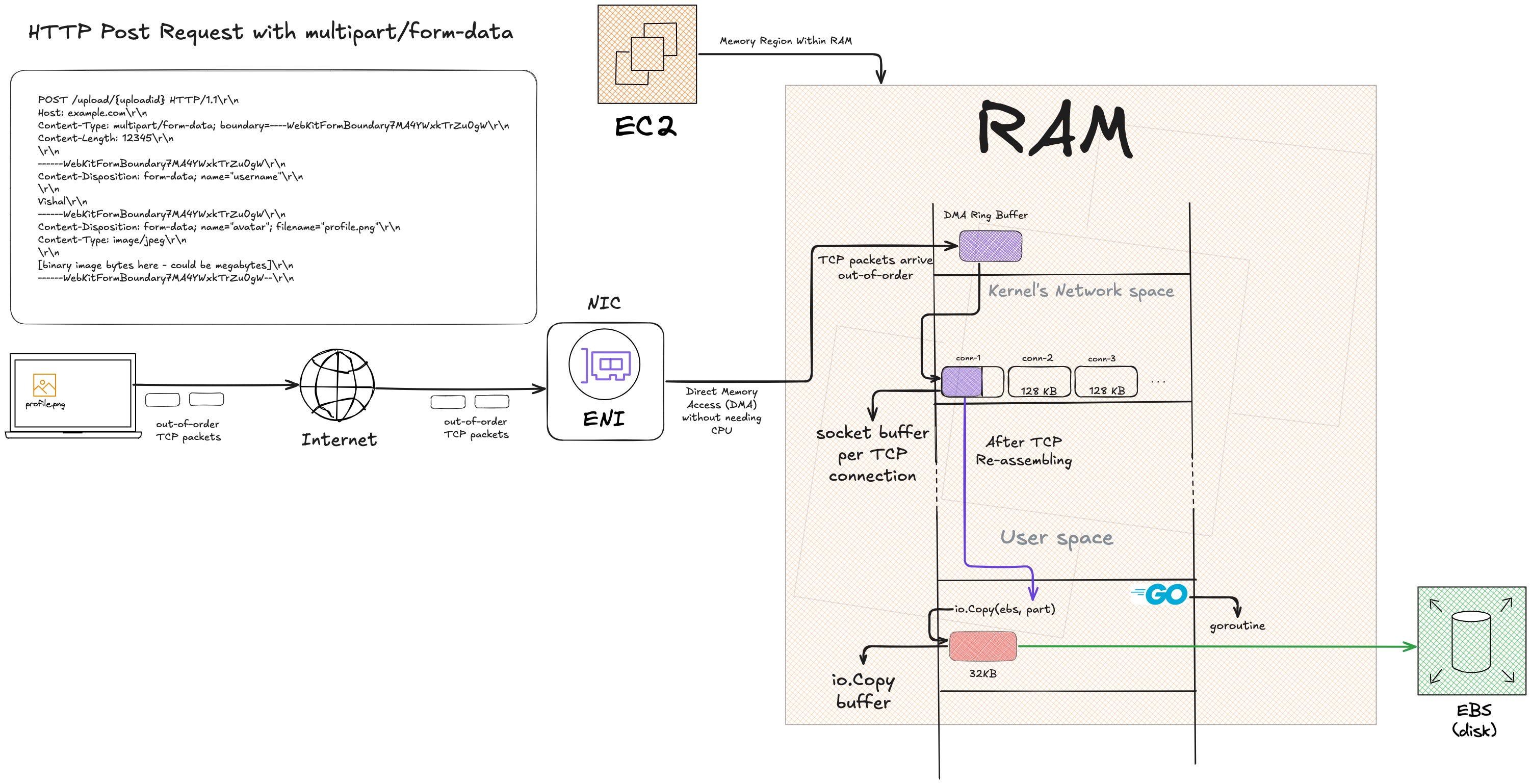
For an 8GB upload:
Socket buffer: ~128KB (kernel-managed)
io.Copy buffer: 32KB (user-space, reused)
Total RAM: ~160KB
The rest is either in transit on the network, already on disk, or waiting in the OS page cache to flush.
Streaming means never accumulating.
This is what makes io.Copy work. It allocates a 32KB buffer once and reuses it in a loop. The buffer size doesn’t grow with file size.
The io.Reader contract
type Reader interface {
    Read(p []byte) (n int, err error)
}
The caller allocates the buffer p. The reader fills it. Returns n, the number of bytes written. The caller only looks at p[:n], never p[:].
io.Copy does this:
buf := make([]byte, 32*1024)  // allocated once
for {
    nr, er := src.Read(buf)
    if nr > 0 {
        nw, ew := dst.Write(buf[0:nr])
    }
    if er == io.EOF { break }
}
Every src.Read asks “give me up to 32KB.” The reader returns however many bytes are available, could be 32KB, could be 1 byte, could be 0 with an error. The caller handles all three.
The Upload Flow
Here’s what happens when a file moves through the system.
Step 1: Initiate
POST /upload/initiateCurl command:
curl -i -X POST http://localhost:8080/upload/initiateServer generates an upload ID, creates an entry in the progress store:
{
  "upload_id": "0f033e91-5317-4476-bc89-4a64bc3354d0",
  "upload_url": "/upload/0f033e91-5317-4476-bc89-4a64bc3354d0"
}
The code:
func (u *UploadAPI) InitiateUpload(ctx context.Context, w http.ResponseWriter, r *http.Request) error {
    id := uuid.NewString()
    u.ups.SetProgress(id, uploadprogress.Progress{})
    apis.WriteJson(w, http.StatusOK, apis.ApiResponse{
        Data: struct {
            UploadId  string `json:"upload_id"`
            UploadUrl string `json:"upload_url"`
        }{
            UploadId:  id,
            UploadUrl: fmt.Sprintf("/upload/%v", id),
        },
    })
    return nil
}
The progress store entry exists before either connection starts. This solves the race, the SSE handler can connect and start polling immediately without waiting for the upload to begin.
Step 2: Two connections open
PUT /upload/0f033e91-5317-4476-bc89-4a64bc3354d0
  ↳ sends file as multipart/form-data

GET /upload/progress/0f033e91-5317-4476-bc89-4a64bc3354d0
  ↳ keeps connection open, receives progress events
Curl commands:
# Upload file
curl -i -X PUT http://localhost:8080/upload/0f033e91-5317-4476-bc89-4a64bc3354d0 \
-F file=@./move-crew-details.csv

# Watch progress (in a separate terminal)
curl -i -N http://localhost:8080/upload/progress/0f033e91-5317-4476-bc89-4a64bc3354d0
Two separate HTTP connections. HTTP/1.1 is half-duplex, a single connection can’t receive a large PUT body and send SSE events simultaneously. One connection uploads, the other streams progress.
Step 3: The complete HTTP PUT request
Here’s what actually arrives at the server:
PUT /upload/0f033e91-5317-4476-bc89-4a64bc3354d0 HTTP/1.1
Host: localhost:8080
Content-Length: 838
Content-Type: multipart/form-data; boundary=----WebKitFormBoundary7MA4YWxkTrZu0gW

------WebKitFormBoundary7MA4YWxkTrZu0gW
Content-Disposition: form-data; name="file"; filename="move-crew-details.csv"
Content-Type: text/csv

(file data bytes)
------WebKitFormBoundary7MA4YWxkTrZu0gW--
The Content-Type header declares multipart/form-data and includes a boundary parameter. That boundary string marks where each part begins and ends in the body. The spec doesn’t require ------ prefixes, that’s just curl’s convention.
Step 4: Validate Content-Type
ctype := r.Header.Get("content-type")
mtype, params, err := mime.ParseMediaType(ctype)
if err != nil {
    return apis.NewErrorf(http.StatusBadRequest, "invalid content type. expected multipart/form-data", "content-type sent in request: %s", ctype)
}

if mtype != "multipart/form-data" {
    return apis.NewError(http.StatusBadRequest, "invalid content type. expected multipart/form-data")
}

_, ok := params["boundary"]
if !ok {
    return apis.NewErrorf(http.StatusBadRequest, "boundary not found in multipart/form-data content type", "content-type sent in request: %s", ctype)
}
Validation happens in three steps:
Parse the header with
mime.ParseMediaTypeVerify media type is
multipart/form-dataVerify
boundaryparameter exists
The server doesn’t validate the boundary value itself. It just passes it to the multipart reader.
Step 5: Stream to disk
reader, err := r.MultipartReader()
if err != nil {
    u.log.Error(ctx, "failed to get multipart reader", "action", "r.MultipartReader", "err", err)
    return apis.NewError(http.StatusInternalServerError, "something went wrong. try again.")
}

for {
    part, err := reader.NextPart()
    if err == io.EOF {
        break
    }
    if err != nil {
        u.log.Error(ctx, "error reading next part", "action", "reader.NextPart", "err", err)
        return apis.NewError(http.StatusInternalServerError, "failed to read part")
    }

    // extract filename from Content-Disposition header
    cdtype := part.Header.Get("content-disposition")
    cdmtype, cdparams, err := mime.ParseMediaType(cdtype)

    filename, ok := cdparams["filename"]
    if ok {
        basepath := filepath.Base(filename)
        tmp, err := os.Create(fmt.Sprintf("./%s", basepath))
        if err != nil {
            return apis.NewError(http.StatusBadRequest, "something went wrong")
        }
        defer tmp.Close()

        wr := uploadwriter.New(tmp, uploadid, u.ups)
        n, err := io.Copy(wr, part)

        u.ups.SetProgress(uploadid, uploadprogress.Progress{
            Err:        err,
            Total:      uint64(n),
            SoFar:      uint64(n),
            IsComplete: true,
        })
    }
}
r.MultipartReader() returns a streaming reader. reader.NextPart() gets each part one at a time. io.Copy allocates a 32KB buffer once, reuses it in a loop.
Step 6: Track progress via wrapped writer
The uploadwriter wraps the file handle, intercepts every Write:
type Writer struct {
    w     io.Writer
    id    string
    sofar uint64
    ups   *uploadprogress.Store
}

func (uw *Writer) Write(p []byte) (int, error) {
    n, err := uw.w.Write(p)
    uw.sofar += uint64(n)
    uw.ups.SetProgress(uw.id, uploadprogress.Progress{
        Err:   err,
        SoFar: uw.sofar,
    })
    return n, err
}
Every chunk written to disk updates the progress store. The SSE handler polls this store every 200ms, streams events to the client.
Step 7: SSE streams back
func (u *UploadAPI) UploadProgress(ctx context.Context, w http.ResponseWriter, r *http.Request) error {
    w.Header().Set("content-type", "text/event-stream")
    w.Header().Set("cache-control", "no-cache")
    w.Header().Set("connection", "keep-alive")

    id := r.PathValue("uploadid")

    for {
        select {
        case <-r.Context().Done():
            return nil
        default:
            progress, err := u.ups.GetProgressById(id)
            if err != nil {
                return apis.NewError(http.StatusNotFound, "upload-id not found")
            }

            if progress.IsComplete {
                fmt.Fprintf(w, "event: upload-progress\ndata: {\"progress\": \"%v\", \"complete\": %v}\n\n", progress.SoFar, progress.IsComplete)
                w.(http.Flusher).Flush()
                u.ups.DeleteProgressById(id)
                return nil
            }

            if progress.SoFar == 0 && !progress.IsComplete {
                time.Sleep(2000 * time.Millisecond)
                continue
            }

            if progress.Err != nil && !progress.IsComplete {
                fmt.Fprintf(w, "event: upload-progress\ndata: {\"error\": \"%v\"}\n\n", "failed to upload. Try again")
                w.(http.Flusher).Flush()
                return nil
            }

            fmt.Fprintf(w, "event: upload-progress\ndata: {\"progress\": \"%v\", \"complete\": %v}\n\n", progress.SoFar, progress.IsComplete)
            w.(http.Flusher).Flush()

            time.Sleep(200 * time.Millisecond)
        }
    }
}
Flush() is critical. Forces each event to be sent as its own HTTP chunk rather than accumulating in the response buffer. Without it, the client sees nothing until the upload completes.
SSE wire format:
HTTP/1.1 200 OK
Content-Type: text/event-stream
Cache-Control: no-cache
Connection: keep-alive
Transfer-Encoding: chunked

event: upload-progress
data: {"progress": "180", "complete": false}

event: upload-progress
data: {"progress": "380", "complete": false}

event: upload-progress
data: {"progress": "838", "complete": true}
The blank line between events is the SSE delimiter. Transfer-Encoding: chunked gets applied automatically by net/http when writing without a known Content-Length.
Here’s what the client actually sees:
curl -i -N http://localhost:8080/upload/progress/0f033e91-5317-4476-bc89-4a64bc3354d0
HTTP/1.1 200 OK
Cache-Control: no-cache
Connection: keep-alive
Content-Type: text/event-stream
Date: Sat, 18 Apr 2026 08:10:00 GMT
Transfer-Encoding: chunked

event: upload-progress
data: {"progress": "60", "complete": false}

event: upload-progress
data: {"progress": "80", "complete": false}

.....

event: upload-progress
data: {"progress": "820", "complete": false}

event: upload-progress
data: {"progress": "838", "complete": true}
Controlling the Flow: Token Bucket Rate Limiting
Now, what if we want to control how fast data flows through this pipeline?
For a small test file, io.Copy is fast. The entire upload completes in under a millisecond, no SSE events, instant completion. To observe the SSE progress stream meaningfully, the upload needs to be slow enough to emit multiple events.
That’s where the token bucket comes in.
Where the Token Bucket Sits
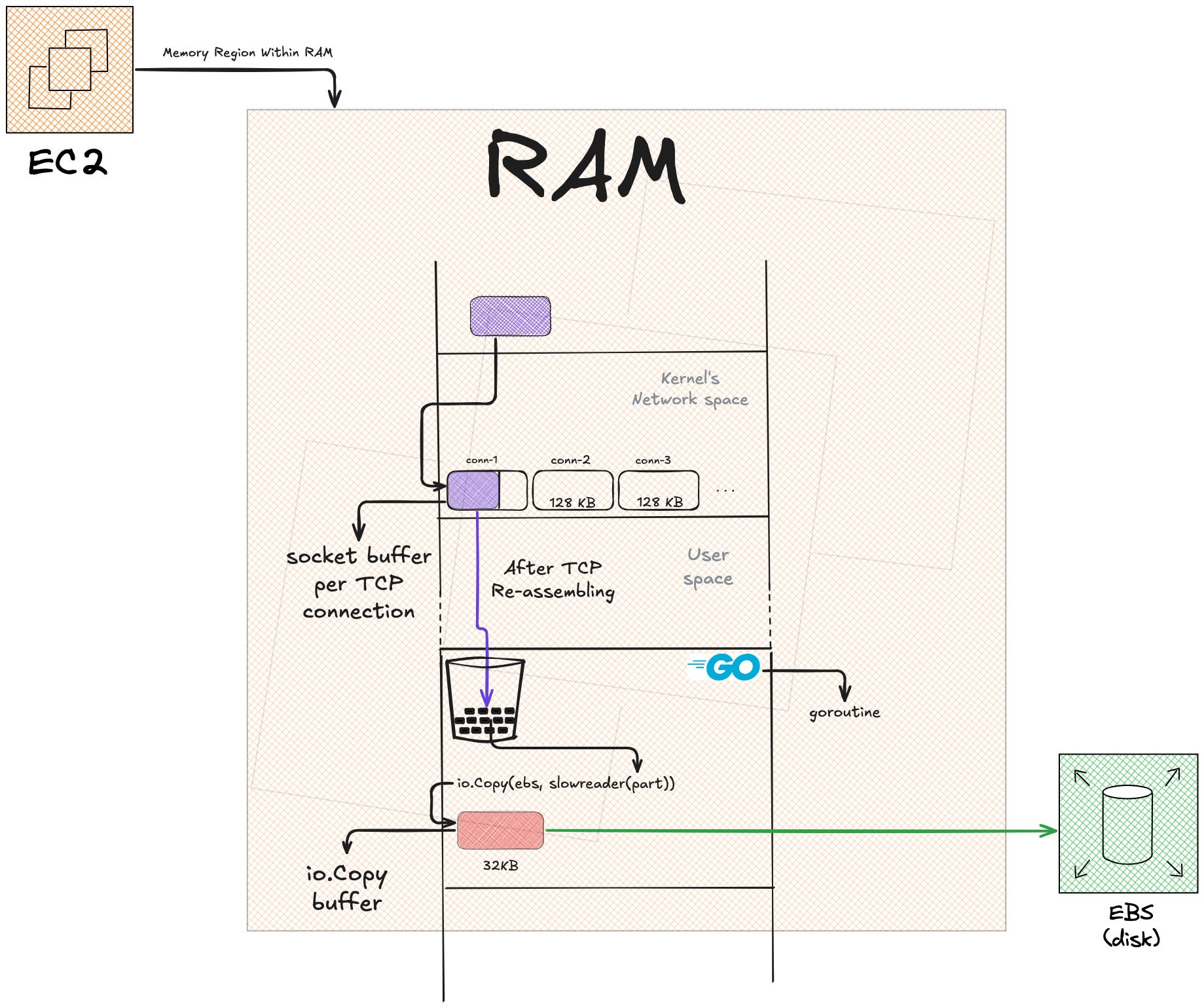
The token bucket sits between the TCP socket buffer and the io.Copy buffer. It’s an io.Reader wrapper, it wraps the multipart part and controls how fast bytes get pulled from the source.
Here’s how it gets wired in:
wr := uploadwriter.New(tmp, uploadid, u.ups)
n, err := io.Copy(wr, slowreader.New(part))
Without slowreader.New(part), the code would be:
n, err := io.Copy(wr, part)That would be full speed. By wrapping part in slowreader.New(part), every read from part now goes through the token bucket first.
Let’s zoom in on how the bucket actually works.
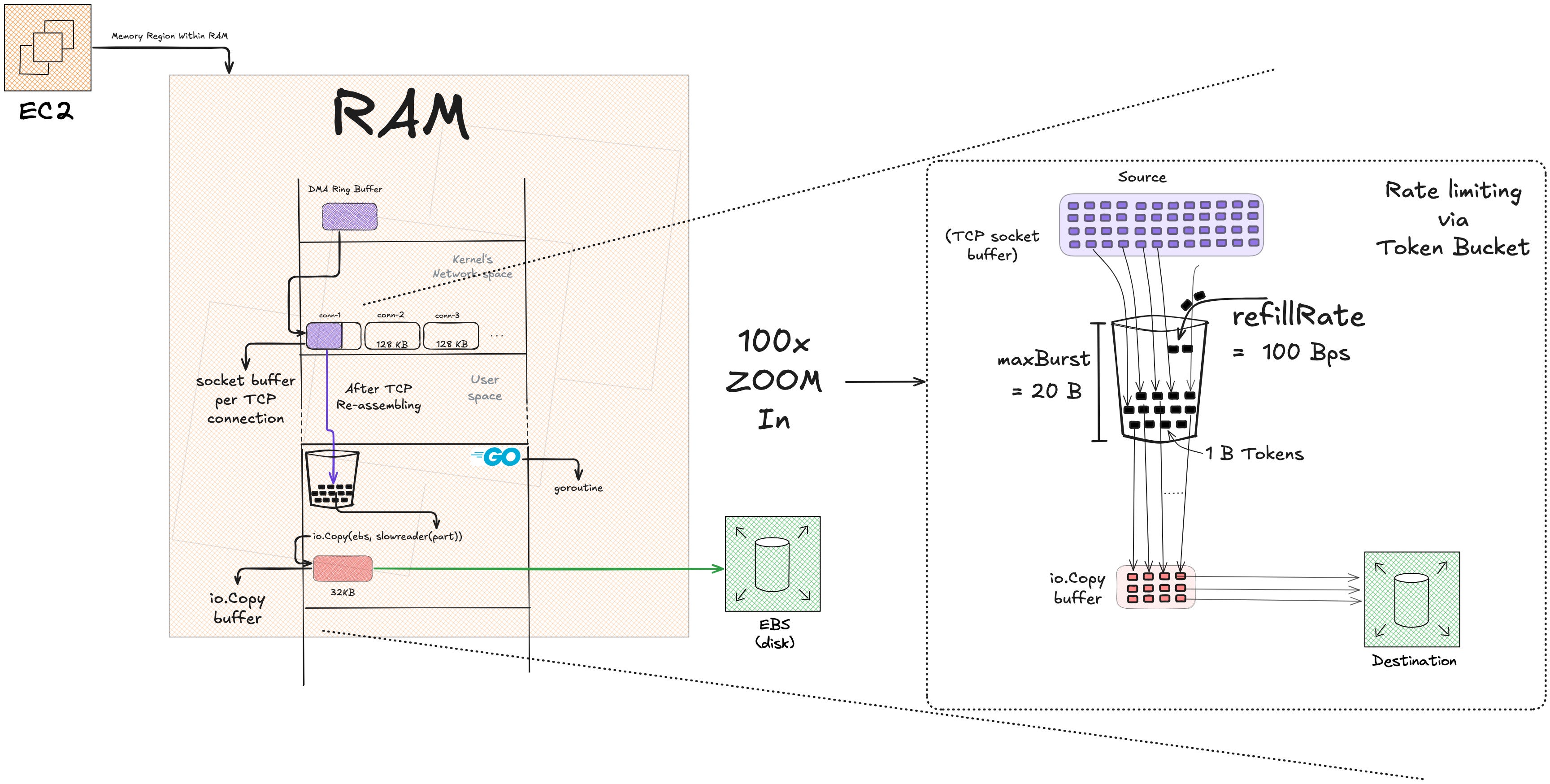
The Token Bucket Model
Think of it like this:
Tokens = currency
Read(p) = purchase
refillRate = how fast you earn currency (100 bytes/sec)
maxBurst = maximum currency you can hold at once (20 bytes)
The bucket starts with some tokens. Every time io.Copy calls Read(p), the bucket checks: do I have enough tokens to fulfill this read? If yes, read and deduct tokens. If no, wait until enough tokens accumulate.
Tokens refill passively over time at refillRate bytes per second, up to a maximum of maxBurst.
Here’s the actual implementation:
type slowReader struct {
    r              io.Reader
    tokenBal       int64
    refillRate     int64
    lastConsumedAt time.Time
    maxBurst       int64
}

func New(r io.Reader) *slowReader {
    return &slowReader{
        r:              r,
        tokenBal:       1 * 20,  // 20 bytes
        refillRate:     100,     // 100 bytes/sec
        maxBurst:       1 * 20,  // 20 bytes max
        lastConsumedAt: time.Now(),
    }
}
Initial state:
tokenBal: 20 bytes (start with a full bucket)refillRate: 100 bytes/secmaxBurst: 20 bytes (can’t hold more than this)lastConsumedAt: timestamp of last read
The Read Implementation
Every time io.Copy calls Read(p), this is what happens:
func (s *slowReader) Read(p []byte) (int, error) {
    // Step 1: Calculate how many tokens we've accumulated since last read
    elapsed := time.Since(s.lastConsumedAt).Seconds()
    newTokens := elapsed * float64(s.refillRate)
    bal := min(s.tokenBal+int64(newTokens), s.maxBurst)

    // Step 2: Decide what to do based on current balance
    // (three cases below)
}
Step 1 calculates token refill. If 0.5 seconds passed since the last read, and refillRate is 100 bytes/sec, then newTokens = 0.5 × 100 = 50 bytes. But bal is capped at maxBurst = 20, so bal = min(20 + 50, 20) = 20.
Step 2 splits into three cases based on how many tokens are available.
Case 1: Enough tokens for the full read
if bal >= int64(len(p)) {
    n, err := s.r.Read(p)
    if err != nil {
        return n, err
    }
    s.tokenBal -= int64(n)
    s.lastConsumedAt = time.Now()
    return n, err
}
io.Copy passes a 32KB buffer as p. If the bucket has 20 tokens and len(p) = 32768, this condition is false. But if len(p) were smaller (say, 10 bytes) and bal = 20, this would trigger.
Read the full buffer, deduct n tokens (actual bytes read), update timestamp, return.
Case 2: Some tokens, but less than len(p)
if bal > 0 && bal < int64(len(p)) {
    temp := make([]byte, bal)
    n, err := s.r.Read(temp)
    if err != nil {
        return n, err
    }
    copy(p, temp[:n])
    s.tokenBal -= int64(n)
    s.lastConsumedAt = time.Now()
    return n, err
}
This is the common case. We have 20 tokens, but io.Copy is asking for 32KB. We can’t give 32KB, so we give what we have.
Steps:
Create a temp buffer sized to
bal(20 bytes)Read into that temp buffer (read at most 20 bytes from the source)
Copy those bytes into the caller’s buffer
pDeduct
ntokensReturn
n(could be 20, could be less if the source gave us less)
The caller (io.Copy) asked for 32KB but got 20 bytes. That’s fine. The io.Reader contract says: return however many bytes are available, up to len(p). The caller handles partial reads.
Case 3: No tokens, wait
// here bal == 0
remaining := min(int64(len(p)), s.maxBurst)

waitTime := (float64(remaining)) / float64(s.refillRate)
time.Sleep(time.Duration(waitTime * float64(time.Second)))

temp := make([]byte, remaining)
n, err := s.r.Read(temp)
copy(p, temp[:n])

s.tokenBal = remaining - int64(n)
s.lastConsumedAt = time.Now()

return n, err
No tokens available. We need to wait for tokens to accumulate.
Critical line:
remaining := min(int64(len(p)), s.maxBurst)The caller asked for len(p) = 32768 bytes. But the bucket can only ever hold maxBurst = 20 bytes. Waiting for 32KB worth of tokens would take 32768 / 100 = 327 seconds.
That’s the bug that happened. The upload hung for 327 seconds per read.
The fix: wait only for min(len(p), maxBurst) = min(32768, 20) = 20 tokens.
Wait time calculation:
waitTime := (float64(remaining)) / float64(s.refillRate)remaining = 20, refillRate = 100, so waitTime = 20 / 100 = 0.2 seconds.
Sleep for 0.2 seconds, then tokens have accumulated. Read up to remaining bytes (20 bytes), copy into caller’s buffer, update state.
After the sleep, the bucket doesn’t necessarily have exactly remaining tokens (some might have accumulated before the sleep, some during). The line:
s.tokenBal = remaining - int64(n)assumes we used n tokens out of the remaining we waited for. If n < remaining, we have leftover tokens for the next read.
Why Three Cases?
The three-case structure handles all possible states:
Bucket is full or has enough → read immediately
Bucket has some tokens → read what we can, don’t wait
Bucket is empty → wait for refill, then read
Without case 2, every partial-token situation would fall through to case 3 and sleep unnecessarily. Case 2 says: “I have 5 tokens right now, you asked for 32KB, here’s 5 bytes, come back for more.”
Why Float Division Matters
Original broken code:
waitTime := remaining / s.refillRate // both int6420 / 100 = 0 in integer division. Zero wait, zero throttling.
Fixed code:
waitTime := float64(remaining) / float64(s.refillRate)20.0 / 100.0 = 0.2. Sleep for 0.2 seconds.
A single type mismatch made throttling disappear silently. No error, no panic, just wrong behavior.
Watching It Work
With maxBurst = 20, refillRate = 100, uploading an 838-byte file, here’s what happens:
Read 1:
io.Copyasks for 32KBBucket has 20 tokens
Case 2 triggers: read 20 bytes, return 20 bytes
Tokens left: 0
Wait ~0.2 seconds (next io.Copy iteration)
Read 2:
io.Copyasks for 32KBBucket has ~20 tokens (refilled during the wait)
Case 2 triggers: read 20 bytes, return 20 bytes
Tokens left: 0
This repeats. Each read yields ~20 bytes. Total reads: 838 / 20 ≈ 42. Each read waits ~0.2 seconds.
Expected time: 42 × 0.2 = 8.4 seconds.
SSE output:
event: upload-progress
data: {"progress": "60", "complete": false}

event: upload-progress
data: {"progress": "180", "complete": false}

event: upload-progress
data: {"progress": "380", "complete": false}

...

event: upload-progress
data: {"progress": "838", "complete": true}
Server logs:
go run cmd/prototypes/main.go
{
  "time": "2026-04-18T13:39:36.837574+05:30",
  "level": "INFO",
  "file": "internal/server/server.go:26",
  "msg": "starting server",
  "port": "0.0.0.0:8080"
}
{
  "time": "2026-04-18T13:39:44.493091+05:30",
  "level": "INFO",
  "file": "internal/middlewares/tracing/tracing.go:26",
  "msg": "Request started",
  "trace": {
    "trace_id": "6be9b4e5-30e6-4cc5-aa30-ee0693aba156",
    "request_method": "POST",
    "request_endpoint": "/upload/initiate"
  }
}
{
  "time": "2026-04-18T13:39:44.493278+05:30",
  "level": "INFO",
  "file": "internal/middlewares/tracing/tracing.go:32",
  "msg": "Request ended. request took",
  "duration": "54.159µs",
  "status": 200,
  "trace": {
    "trace_id": "6be9b4e5-30e6-4cc5-aa30-ee0693aba156",
    "request_method": "POST",
    "request_endpoint": "/upload/initiate"
  }
}
{
  "time": "2026-04-18T13:39:58.593116+05:30",
  "level": "INFO",
  "file": "internal/middlewares/tracing/tracing.go:26",
  "msg": "Request started",
  "trace": {
    "trace_id": "50580d5f-469e-4f40-aa81-f11471abdb3c",
    "request_method": "GET",
    "request_endpoint": "/upload/progress/0f033e91-5317-4476-bc89-4a64bc3354d0"
  }
}
{
  "time": "2026-04-18T13:40:00.146181+05:30",
  "level": "INFO",
  "file": "internal/middlewares/tracing/tracing.go:26",
  "msg": "Request started",
  "trace": {
    "trace_id": "2891a706-c295-408c-bd7c-142745735f04",
    "request_method": "PUT",
    "request_endpoint": "/upload/0f033e91-5317-4476-bc89-4a64bc3354d0"
  }
}
{
  "time": "2026-04-18T13:40:08.385989+05:30",
  "level": "INFO",
  "file": "internal/middlewares/tracing/tracing.go:32",
  "msg": "Request ended. request took",
  "duration": "8.239561818s",
  "status": 200,
  "trace": {
    "trace_id": "2891a706-c295-408c-bd7c-142745735f04",
    "request_method": "PUT",
    "request_endpoint": "/upload/0f033e91-5317-4476-bc89-4a64bc3354d0"
  }
}
{
  "time": "2026-04-18T13:40:08.426012+05:30",
  "level": "INFO",
  "file": "internal/middlewares/tracing/tracing.go:32",
  "msg": "Request ended. request took",
  "duration": "9.832609934s",
  "status": 200,
  "trace": {
    "trace_id": "50580d5f-469e-4f40-aa81-f11471abdb3c",
    "request_method": "GET",
    "request_endpoint": "/upload/progress/0f033e91-5317-4476-bc89-4a64bc3354d0"
  }
}
The PUT took 8.239 seconds. Expected: ~8.4 seconds.
The SSE stream stayed open for 9.832 seconds, slightly longer than the upload because it waited for the final completion event before closing.
The SSE handler polls every 200ms. Each poll sees progress incrementing by ~20–40 bytes (depending on timing). The progress climbs steadily until completion.
What This Shows
HTTP headers are declarative. The client declares content type in the Content-Type header. Don’t sniff the body.
Streaming means never accumulating. r.MultipartReader() + io.Copy keeps RAM at ~160KB for any file size.
Go’s io.Reader contract is precise. Caller allocates, reader fills, only p[:n] is valid.
SSE is HTTP with flushing. Content-Type: text/event-stream + Transfer-Encoding: chunked + Flush(). No magic.
Rate limiting is three cases, not one. Token bucket Read splits into: enough tokens, some tokens, no tokens.
Precision matters. Integer division 20/100 = 0. Float division 20.0/100.0 = 0.2. One type mismatch kills throttling silently.
What’s Next
Prototype 02: HTTP Client Connection Pool Analyzer.
The goal is to visualize connection reuse, test pool configurations, understand how http.Client actually manages connections under the hood.
Full code: https://github.com/vishal2098govind/http-deep-dive